TinyMakerWifi › Resins

Resin profiles for the TinyMaker

Pick a resin, tap once, and the printer takes its exposure, bottom layers, lift and density - all calibrated on this machine.

Why a separate list for this printer? The TinyMaker masks with a colour screen, not a mono one, and a colour screen lets through far less UV - the same resin needs about four times the exposure written on the bottle. Its plate is small as well, 41 × 31 mm, so parts release from the film with different forces. Settings from other printers do not fit.
Type
Washing

In calibration

Calibration under way. These are working values - printed and checked, but not published as a profile yet.

Calibrated profiles

Calibration finished. Each profile installs on the printer in one tap.

In the queue

Samples waiting for plate time. A few already have working numbers above and are back here because the method has grown since.

How profiles are used on the TinyMaker

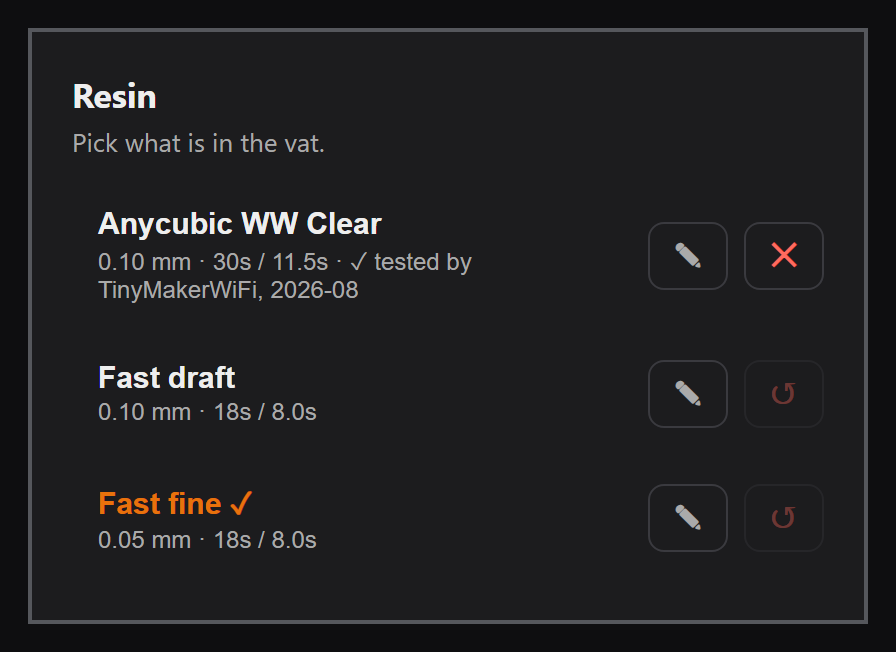
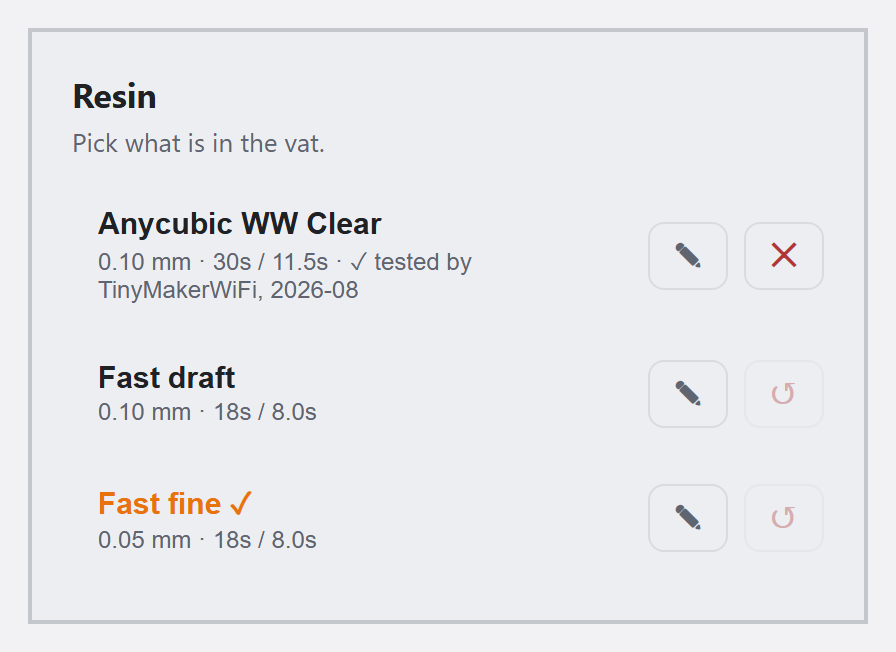
Resin card in the TinyMaker dashboard Resin card in the TinyMaker dashboard

Every resin tested here goes into the printer's resin library. Any TinyMaker owner installs it from the dashboard's Resin card in one tap, edits the numbers afterwards if their own vat asks for it, and gets a Buy link in the same row for the resins that carry a shop address.

The printer lists sixteen named profiles, four of them built in; the ticked one is what the next print uses. Exposure, bottom layers, lift and density travel with the profile, and the line tested by TinyMakerWiFi says which month the numbers were measured.

See it running in the live demo → · in the manual

How calibration is done

One machine, one sequence, written down as it runs. That is what makes two resins here comparable at all.

One machine, one vat

Every print here comes off the same TinyMaker, with the same film and the same UV panel. Another panel, or a colder room, moves these numbers - which is why they are measured here instead of copied from another printer.

The screen sets the limit

One pixel is 0.1275 mm, so no resin prints a wall thinner than about two of them. A feature that fails is measured in pixels first; more than once that has saved a round of blaming the chemistry.

Every print is logged

Exposure, resin, time and what the part looked like afterwards - each step is written down as it happens. The published profile is the last line of that log, not a verdict added later.

Density is weighed, not copied

Consumption is worked out from the layer images and the resin's density, so density has to be measured - a known volume on a scale, once per bottle. Until then the card says the number came off the label.

The method keeps moving

When the sequence gains a step, earlier resins go back in the queue. Entries measured before the current method say so on their card instead of passing as finished work.

One pair of hands

Tested and written by Viktoras Šidlauskas, who maintains the TinyMakerWifi firmware. The same hands, the same printer, the same notebook for every resin here.
For resin manufacturers

Send a bottle and it goes through the same sequence. No fee, no agreement, no promise about the outcome: the numbers are published whichever way they come out.

The TinyMaker is where a lot of people meet SLA for the first time - small, cheap and forgiving, and a test print costs millilitres rather than a tank. Those owners move on to larger machines, and they take the resin they already trust with them.

Your product, your name

The resin is listed under the name you use in your own shop, with a link to it. If you would rather see different wording or your own photo on the card, say so and it goes in.

Numbers your customers can use

The result is not a review - it is a working profile. A TinyMaker owner installs it in one tap and prints, instead of burning a tank finding the exposure for a colour screen themselves.

Free to reuse

Quote the figures, link to the page, put them in your own settings table or on the product page. They were measured on one machine and that is stated, so nobody is misled either way.

TinyMakerWifi logo
Logo and assets

If you want to link back, take the mark here - no need to ask: SVG · PNG 512. Point it wherever fits: the resin results if the link sits next to a product, or tinymakerwifi.com for the project itself.

To send a sample or ask anything, write to hello@tinyowllabs.com - or find me in the TinyMaker owners' group, where the results get discussed by the people actually printing with them.